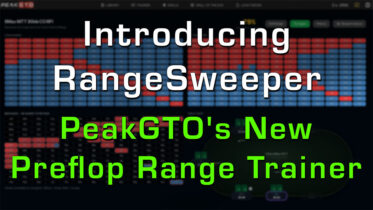
Most players “study” their preflop range trainer by staring at a chart, nodding, and closing the tab. Then they sit down, face a 3-bet from the cutoff, and the range they were sure they knew turns into a blur. Reading a chart trains recognition. The table demands recall, and those are not the same skill.
RangeSweeper is built to close that gap. It is a new preflop range trainer inside PeakGTO that hands you a blank grid, asks you to complete the range from memory, then grades your answer against the solver.
What Is RangeSweeper?
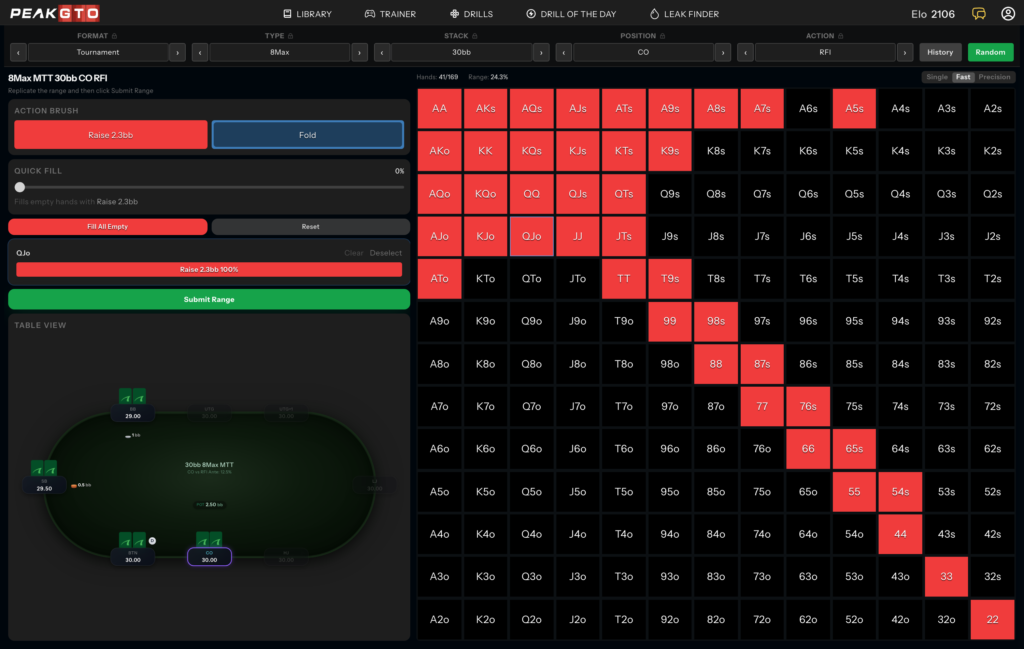
The prompt on every screen is simple: “Complete the Range.” You pick a spot, for example 8-max tournament, 30 big blinds, cutoff, raise first in, and you get the full 169-hand grid completely blank. Your job is to fill in how you would play every hand, then submit it and see how close you were to the GTO solution.
It plays like a game, not a chart. Every attempt gives you a percentage accuracy score, so how well you know a range becomes a number you can watch climb attempt after attempt.
You can drill any spot you actually play. If a preflop scenario exists in the PeakGTO library, you can practice it in RangeSweeper, across cash and tournament formats, every stack depth, and every position at the table.
How It Works
Three steps, then instant feedback:
- Pick a spot. Set the format, stack, position, and action up top, or hit Random to be tested on a spot you did not choose. You can lock any setting so Random only reshuffles the rest.
- Paint the range. Select an action brush, such as Raise 2.3bb or Fold, and click the hands you want to assign to it. A Quick Fill slider builds a range fast by assigning a set percentage of hands in one move, and Fill All Empty assigns whatever you have not touched.
- Submit and score. Once all 169 hands are assigned, hit Submit Range and RangeSweeper compares your grid to the solver, then hands back a single accuracy percentage.
Reading Your Results
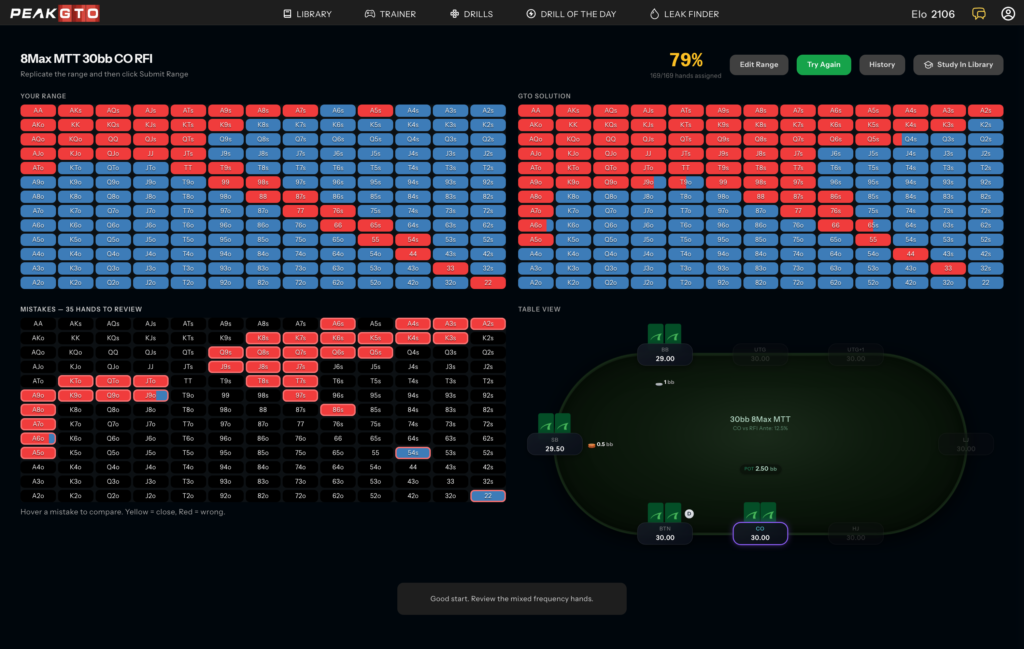
The score is the headline. The breakdown is the value. RangeSweeper shows your grid and the solver solution side by side, so you instantly see whether you are opening too tight, too wide, or missing the borderline hands.
A mistakes view then flags every hand you got wrong and separates the close calls from the clear misses, so you can see which errors actually matter instead of sweating small rounding differences. That is the fastest way to find your real leaks. From there you can jump to Study In Library to learn the range, or Try Again to retake the spot and prove you fixed it.
Single, Fast, and Precision Modes
Three grading modes let the difficulty scale with you:
- Single. Fill one action only; empty hands are treated as not taking that action. Best for learning a range’s basic shape.
- Fast. Grades you on the highest-frequency action for each hand. The right default for most players.
- Precision. Requires exact mixing. A hand the solver raises 40% of the time has to be treated as a mix, not a pure raise or fold. This is where serious grinders sharpen the edges.
How to Train With It
Lock one format and drill it position by position rather than bouncing between short-stacked tournament spots and deep cash. After each attempt, note the hands that keep showing up red and study those specific leaks. Then let your accuracy score tell the truth: if it is climbing over a few weeks, your study is working; if it is flat, you are reviewing passively again.
A few focused sessions will do more for your preflop game than hours of scrolling through static charts.
Try RangeSweeper
Preflop is the foundation every other decision is built on, and it is the most masterable part of the game because the answers are most knowable. RangeSweeper turns that knowledge from something you passively recognize into something you can reliably produce.
Become a premium member today to start training with RangeSweeper and everything else PokerCoaching has to offer. Complete your first range and watch your accuracy climb.
Frequently Asked Questions
What is a preflop range trainer?
A study tool that tests how well you know which hands to play in each preflop spot. A good one like RangeSweeper makes you reconstruct the range yourself and grades it against a solver, so you practice recall rather than recognition.
Does RangeSweeper cover cash games and tournaments?
Yes. It includes both formats across every stack depth and position. If a preflop scenario is in the PeakGTO library, you can train it in RangeSweeper, so you can practice the exact situations you play.
TL;DR: AI Summary of the Article
- Reading range charts only trains recognition, so the range blurs at the table where you actually have to recall it from memory.
- RangeSweeper is a preflop range trainer in PeakGTO that gives you a blank grid, has you complete the range, and scores it against the solver as a percentage accuracy you can watch improve.
- The loop is simple: pick or randomize a spot, paint hands with brushes, fill the rest fast, then submit for an instant accuracy percentage.
- The results screen shows your range next to the solver and separates your close calls from your clear misses, so you find the leaks that actually matter.
- Single, Fast, and Precision modes scale the difficulty from learning a range’s shape to matching exact solver frequencies.
- Train by locking one format, drilling position by position, studying your red hands, and letting your accuracy score tell you honestly whether your study is working.